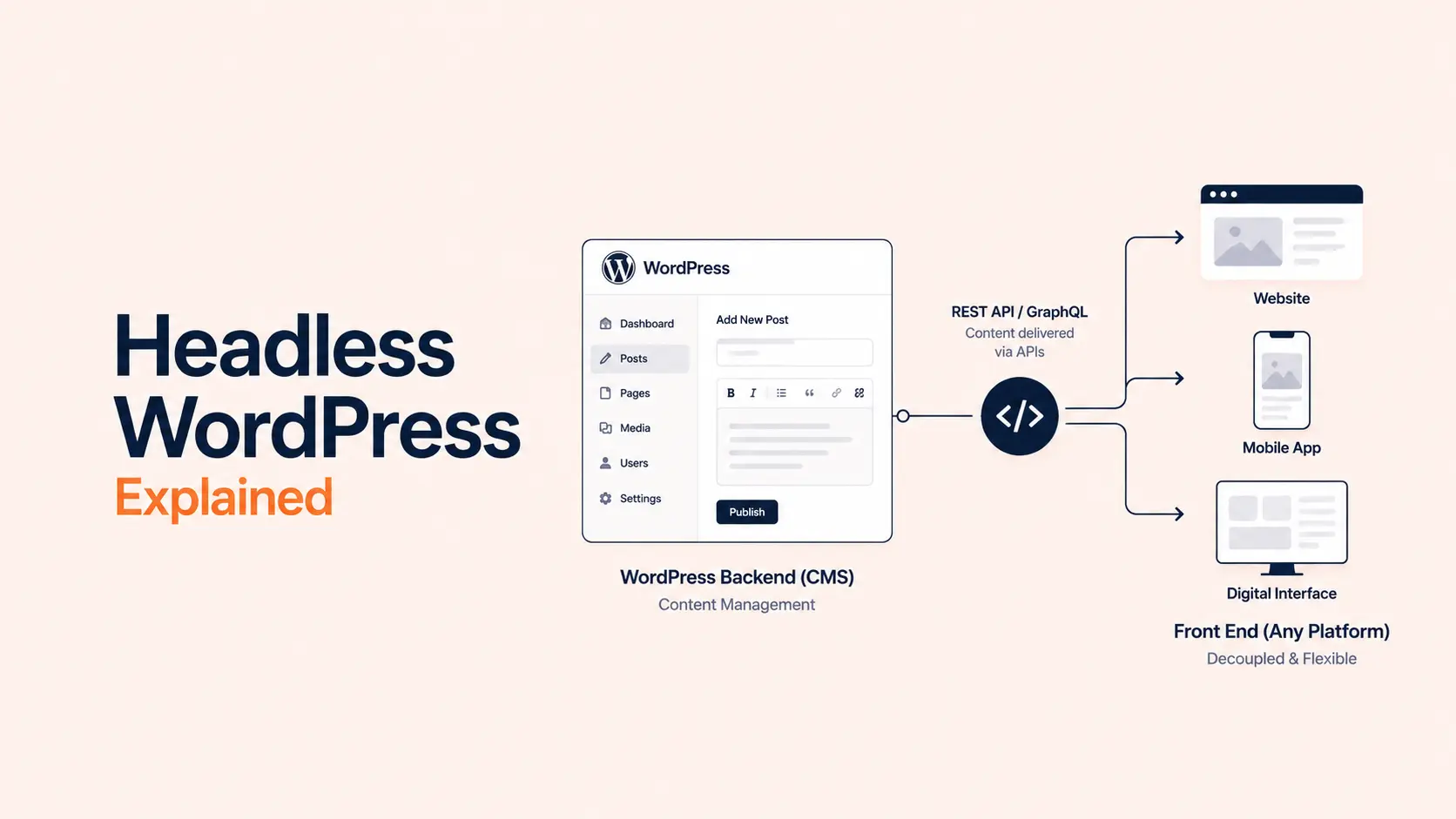


Headless WordPress separates WordPress from the public-facing website. WordPress stays in place as the content management system, but a separate frontend application retrieves content through an API and renders what visitors see.
That can be valuable when a business is building an application-like website, publishing the same content to multiple channels, or needs a frontend architecture that must evolve independently from WordPress. For a typical marketing or service website, however, going headless can add more cost and maintenance than value.
The important question is not whether headless WordPress is more modern. It is whether decoupling the CMS from the frontend solves a real business or technical requirement.
TL;DR: Should You Use Headless WordPress?
Headless WordPress makes the most sense when WordPress needs to power a custom application, mobile app, multiple frontends, or a highly specialized web experience. It gives developers more control over frontend technology and content delivery, but it also means your team must rebuild or integrate capabilities traditional WordPress normally handles for you.
- Use traditional WordPress for most marketing websites, service businesses, blogs, portfolios, and standard WooCommerce stores.
- Consider headless WordPress for application-like frontends, multi-channel publishing, or projects where frontend technology must be independent from WordPress.
- Consider a hybrid approach when most of the site works well in WordPress but selected apps or channels need API access.
- Headless is not automatically faster, more secure, or better for SEO. Those results depend on implementation quality.
- Expect more engineering: WordPress, APIs, frontend code, hosting, deployments, caching, previews, SEO output, analytics, and monitoring all need to work together.
What Is Headless WordPress?
A traditional WordPress website combines two major layers:
- Backend: wp-admin, database, posts, pages, users, media, plugins, and editorial workflows.
- Frontend: the WordPress theme or block theme that renders those resources into pages.
Headless WordPress keeps the backend but replaces the normal theme-driven frontend with a separate application. That frontend may use Next.js, React, Vue, Nuxt, a native mobile framework, or another technology.
The application requests content from WordPress through an API. WordPress includes the REST API in core. Teams that prefer GraphQL can add WPGraphQL, an open-source plugin that exposes WordPress through GraphQL.
A simplified architecture is:
Editor → WordPress → REST API or GraphQL → Frontend application → Visitor
WordPress is still the publishing system. It simply stops being responsible for rendering the public interface.
Headless WordPress vs Traditional WordPress
| Area | Traditional WordPress | Headless WordPress |
|---|---|---|
| Content management | WordPress | WordPress |
| Frontend | WordPress theme / block theme | Separate application |
| Data delivery | PHP/theme rendering | REST API or GraphQL |
| Hosting | Usually one main WordPress stack | WordPress plus frontend hosting |
| Preview | Native or theme-integrated | Requires frontend integration |
| Plugin frontend output | Usually works directly | May require reimplementation |
| Frontend flexibility | High, but inside WordPress | Independent technology stack |
| Complexity | Lower | Higher |
| Multi-channel delivery | Possible | A major strength |
Neither model is universally better. Traditional WordPress prioritizes integration and simplicity. Headless WordPress trades some of that integration for frontend independence.
How Does Headless WordPress Work?
A practical headless setup normally includes four pieces.
1. WordPress Manages Content
Editors still use wp-admin to create posts, pages, custom post types, taxonomies, media, and structured content. Gutenberg can remain the editing interface.
Going headless does not remove WordPress. It changes WordPress from a full website platform into the content backend for another application.
2. An API Exposes the Data
The WordPress REST API exposes content as JSON. Public content can generally be read without authentication, while private or privileged operations require authentication.
WordPress also supports Application Passwords for API integrations. These are separate from the user’s normal login password and can be individually revoked.
WPGraphQL provides another approach. GraphQL lets the frontend request a specific data shape, which can be convenient for complex relationships. REST remains perfectly suitable for many headless projects.
3. A Separate Frontend Renders the Experience
The frontend fetches WordPress data and controls the user interface, routing, components, interactions, and rendering strategy.
This is where headless gains most of its flexibility. The frontend can be built and deployed independently from WordPress as long as both sides continue to agree on the content and API contract.
4. Publishing Workflows Connect Both Systems
A production setup also needs cache invalidation, previews, redirects, analytics, deployment logic, and error handling.
For example, Next.js provides Draft Mode for previewing unpublished CMS content, but a developer still has to connect and secure that workflow with WordPress.
Benefits of Headless WordPress
1. Greater Frontend Freedom
The clearest advantage is that the public experience is no longer tied to the WordPress theme layer.
That can be useful for dashboards, configurators, interactive directories, data visualizations, membership applications, customer portals, or other interfaces that behave more like software than a standard website.
A unique design alone is not a strong reason to go headless. Traditional WordPress can already support extensive custom development. Headless becomes more valuable when the architecture of the frontend needs to be independent.
2. Content Can Power Multiple Channels
A headless CMS can become a central content source for more than one destination.
The same WordPress content might feed a website, mobile application, kiosk, customer portal, digital display, or several brand frontends.
This is one of the strongest headless use cases because each client receives structured content instead of depending on WordPress-rendered pages.
3. Frontend Teams Can Work More Independently
Large organizations may have dedicated frontend teams with their own framework, deployment pipeline, and release schedule. WordPress can remain the editorial platform while the application team works separately.
That does not eliminate coordination. Changes to fields, schemas, URLs, preview behavior, or API responses can still affect the frontend. It simply gives each layer a clearer technical boundary.
4. More Control Over Rendering and Deployment
A separate frontend can use static generation, server-side rendering, incremental regeneration, edge delivery, or application-specific caching.
That flexibility can be valuable for unusual traffic patterns or interactive products. It does not guarantee better performance. API latency, JavaScript, hydration, caching strategy, and implementation quality still determine the result.
5. Editors Can Keep WordPress
Some organizations want a modern application stack without replacing the CMS their editorial team already understands. Headless lets them retain wp-admin, media management, roles, and familiar publishing processes while developers change the presentation layer.
Drawbacks of Headless WordPress
1. You Now Maintain Multiple Systems
Traditional WordPress combines content management and page rendering in one ecosystem. Headless separates them.
A typical project may require ongoing maintenance for WordPress, APIs, frontend dependencies, frontend hosting, CI/CD, caching, authentication, monitoring, previews, and integrations.
For a small business website, that can be far more infrastructure than the project needs.
2. Plugins Do Not Automatically Control the Frontend
Backend-focused plugins can continue to work normally, but plugins that inject HTML, CSS, JavaScript, schema, forms, widgets, or other frontend output may not transfer automatically.
That functionality may need to be exposed through the API and rebuilt in the frontend.
Before choosing headless, inventory the plugins your site relies on. Separate tools that manage data inside WordPress from tools that expect to control the rendered theme.
3. Preview and Visual Editing Need Extra Work
In traditional WordPress, the CMS understands the frontend theme. In a headless setup, it does not automatically know how the external application will render a draft.
Preview, scheduled content, block rendering, and editor-to-frontend parity therefore require deliberate integration. This can matter a lot for marketing teams that frequently create landing pages or need visual approval before publishing.
4. SEO Becomes a Frontend Responsibility
WordPress can still store SEO data, but the headless application must output it correctly.
Developers need to account for titles, meta descriptions, canonical URLs, robots directives, structured data, Open Graph metadata, XML sitemaps, redirects, pagination, alternate language URLs, status codes, and internal links.
Headless WordPress can perform very well in search. It is simply not inherently more SEO-friendly. If SEO matters, include the requirements in architecture and launch QA rather than assuming the frontend framework handles them. Tenfic’s WordPress SEO checklist can help define that QA scope.
5. Development and Maintenance Usually Cost More
A headless project normally adds specialized frontend engineering, API integration, separate deployments, preview logic, monitoring, and framework maintenance.
That cost can be justified when decoupling solves a valuable problem. It is harder to justify when the site could meet the same goals with a custom WordPress theme or block-based build.
For budget context, compare the requirements with Tenfic’s WordPress website cost guide.
6. Security Changes Rather Than Disappears
Some headless setups reduce direct exposure of the WordPress frontend or place the CMS on a separate hostname. That can be useful, but headless is not automatically secure.
You still have WordPress, APIs, credentials, frontend dependencies, deployment tokens, third-party services, and potentially multiple hosting environments to protect.
The attack surface changes. Security still depends on access controls, API design, updates, secret management, monitoring, and infrastructure quality.
Is Headless WordPress Faster?
It can be, but headless is not a performance switch.
A decoupled frontend can generate static pages, cache heavily, deliver content at the edge, and avoid WordPress theme rendering on visitor requests. Those are useful options.
A poor implementation can also introduce large JavaScript bundles, client-side rendering delays, inefficient API calls, cache problems, and hydration overhead. Meanwhile, traditional WordPress can use page caching, CDNs, optimized themes, object caching, image optimization, and careful plugin selection.
The better question is:
Does the frontend need a rendering, scaling, or interaction model that is materially easier to operate outside WordPress?
If not, performance alone is a weak reason to decouple.
Is Headless WordPress Better for SEO?
No architecture gets an automatic SEO advantage.
Search engines need crawlable content, correct metadata, internal links, structured data, redirects, canonical URLs, sitemaps, and appropriate HTTP status codes. A server-rendered or statically generated headless site can deliver all of this well.
The operational difference is that traditional WordPress SEO plugins can directly affect the rendered page. In a headless implementation, the frontend often has to fetch SEO data from WordPress and translate it into the correct page output.
That is entirely solvable, but it must be part of the development scope.
Can WooCommerce Be Headless?
Yes, but ecommerce adds substantial complexity.
A store is more than a product catalog. A headless WooCommerce frontend may need to handle cart state, customer sessions, pricing, inventory, coupons, shipping, tax, checkout, payments, accounts, orders, analytics, and extension compatibility.
Many WooCommerce extensions assume a WordPress-rendered storefront. Developers should verify each critical extension rather than assuming the normal frontend behavior will carry over.
Traditional WooCommerce is usually simpler for a standard online store. Headless becomes more compelling when the shopping experience is highly application-like, the business serves several channels, or a dedicated engineering team needs full control of the commerce frontend.
When Should You Use Headless WordPress?
Headless is easiest to justify when at least one important requirement is difficult to deliver cleanly through a normal WordPress frontend.
Use It for Multi-Channel Publishing
If one content team needs to publish to a website, mobile app, in-store display, partner portal, and other clients, an API-first backend can reduce duplication.
Use It for Application-Like Frontends
Customer dashboards, SaaS interfaces, complex directories, interactive products, and data-heavy applications may already require a frontend centered on application state and custom components. WordPress can provide the editorial backend without controlling the interface.
Use It When WordPress Is One of Several Data Sources
Some applications combine WordPress content with product APIs, account data, search services, inventory systems, or other backends. In those projects WordPress may fit better as one API source within a broader application architecture.
Use It When Frontend Deployments Must Be Independent
A mature frontend team may need a separate release cycle, framework, and infrastructure. If the organization can govern the API contract and maintain both systems long term, decoupling can create useful separation.
When Should You Avoid Headless WordPress?
Avoid It for a Normal Business Website Without a Specific Requirement
A service business with a homepage, service pages, case studies, blog, forms, and contact pages usually gains little from maintaining a separate frontend application.
A well-built traditional WordPress site is simpler and less expensive. Tenfic’s WordPress website development guide covers that approach in more detail.
Avoid It When Marketers Need Maximum Visual Independence
If nontechnical users frequently create landing pages and expect the public site to match WordPress blocks or builder layouts immediately, full decoupling may introduce friction.
Preview and component systems can solve this, but they need engineering. If editor autonomy is a priority, compare the workflows in WordPress Page Builder vs Gutenberg.
Avoid It When You Depend Heavily on Frontend Plugins
Forms, SEO tools, membership systems, localization, ecommerce extensions, analytics, personalization, and other plugins may rely on WordPress hooks or theme output.
If many critical features work this way, a headless migration can turn simple plugin configurations into custom development projects.
Avoid It Without Ongoing Engineering Capacity
A headless frontend needs maintenance after launch. Framework versions change, packages require security updates, APIs evolve, builds fail, and integrations need regression testing.
If nobody owns that work, the architecture can become technical debt quickly.
Traditional vs Headless vs Hybrid WordPress
| Architecture | Best Fit | Main Advantage | Main Trade-Off |
|---|---|---|---|
| Traditional WordPress | Marketing sites, blogs, standard ecommerce | Integrated and easier to operate | Less frontend independence |
| Headless WordPress | Apps, multi-channel delivery, specialized frontends | Maximum frontend control | Higher complexity and cost |
| Hybrid WordPress | Standard site plus selected API-driven experiences | Decouple only where useful | Requires clear architecture boundaries |
A hybrid model is often the most practical middle ground. WordPress can render the normal marketing site while APIs feed a mobile app, member portal, interactive tool, or another separate experience.
REST API vs WPGraphQL for Headless WordPress
The WordPress REST API is built into WordPress core and is a natural starting point for headless integrations. It exposes resources through predictable endpoints and is sufficient for many projects.
WPGraphQL is an optional plugin that adds a GraphQL schema. It can be useful when the frontend needs related data in precise shapes or the development team already has strong GraphQL tooling.
Choose based on the application rather than popularity. Evaluate data relationships, developer expertise, authentication, caching, custom fields, plugin integrations, and how much schema customization the project needs.
What Does a Headless WordPress Stack Include?
A typical production stack may include:
- WordPress for content, users, media, and editorial workflows.
- REST API or WPGraphQL for content delivery.
- Structured fields or content models for reliable frontend data.
- A frontend framework such as Next.js or Nuxt.
- Frontend hosting and CI/CD.
- Caching or revalidation so published changes appear quickly.
- Draft preview integration.
- SEO rendering for metadata, schema, canonicals, sitemaps, and redirects.
- Analytics and monitoring across both systems.
The correct stack should match the product requirements and team skills, not a technology trend.
Headless WordPress Decision Checklist
Before approving a headless build, answer these questions:
- What problem does decoupling solve that traditional WordPress cannot solve efficiently?
- Will WordPress content be consumed by multiple frontends or channels?
- Is the public experience genuinely application-like?
- Which existing plugins depend on controlling the frontend?
- How will previews, SEO, redirects, analytics, forms, search, and publishing work?
- Who will maintain the frontend framework, APIs, hosting, deployments, and dependencies after launch?
- Does the business value justify the additional development and maintenance cost?
If the main goal is simply a faster or more modern-looking website, optimize or customize traditional WordPress first. If the requirements involve multi-channel delivery, application architecture, several data sources, or independently managed frontends, headless deserves serious evaluation.
Conclusion: Use Headless WordPress for a Reason
Headless WordPress is a powerful architecture when WordPress needs to remain the editorial CMS while a separate application controls the user experience. It can work especially well for multi-channel publishing, custom applications, complex frontend systems, and organizations with the engineering capacity to maintain a decoupled stack.
The trade-off is that your team becomes responsible for reconnecting capabilities WordPress normally provides as one integrated system: previews, plugin output, SEO rendering, caching, analytics, deployment, and frontend maintenance.
For most straightforward business websites, traditional WordPress remains the simpler choice. If only selected experiences need APIs, hybrid WordPress may offer a better balance. Choose full headless when the requirements justify running two coordinated systems, not because the architecture sounds more modern.
Frequently Asked Questions About Headless WordPress
Is headless WordPress still WordPress?
Yes. WordPress remains the CMS and backend. A separate application renders the public frontend instead of a WordPress theme.
Is headless WordPress faster than normal WordPress?
Not automatically. It can use powerful rendering and caching strategies, but speed still depends on frontend code, APIs, hosting, caching, images, JavaScript, and implementation quality.
Is headless WordPress better for SEO?
No inherent SEO advantage comes from going headless. The frontend must correctly output crawlable content, titles, descriptions, canonicals, robots rules, structured data, sitemaps, redirects, internal links, and status codes.
Can WordPress plugins work with a headless site?
Many backend-focused plugins can. Plugins that depend on a WordPress theme or inject frontend output may require API integration or a separate frontend implementation.
Do I need WPGraphQL for headless WordPress?
No. WordPress includes the REST API in core. WPGraphQL is an optional GraphQL plugin. The right choice depends on the data model and development requirements.
Can Gutenberg be used with headless WordPress?
Yes. Gutenberg can remain the editing interface, but the external frontend must render the blocks or structured content consistently and provide an appropriate preview workflow.
Is headless WordPress good for small businesses?
Usually only when the business has an unusual application or multi-channel requirement. For a typical service, portfolio, blog, or lead-generation site, traditional WordPress is generally simpler, cheaper, and easier to maintain.