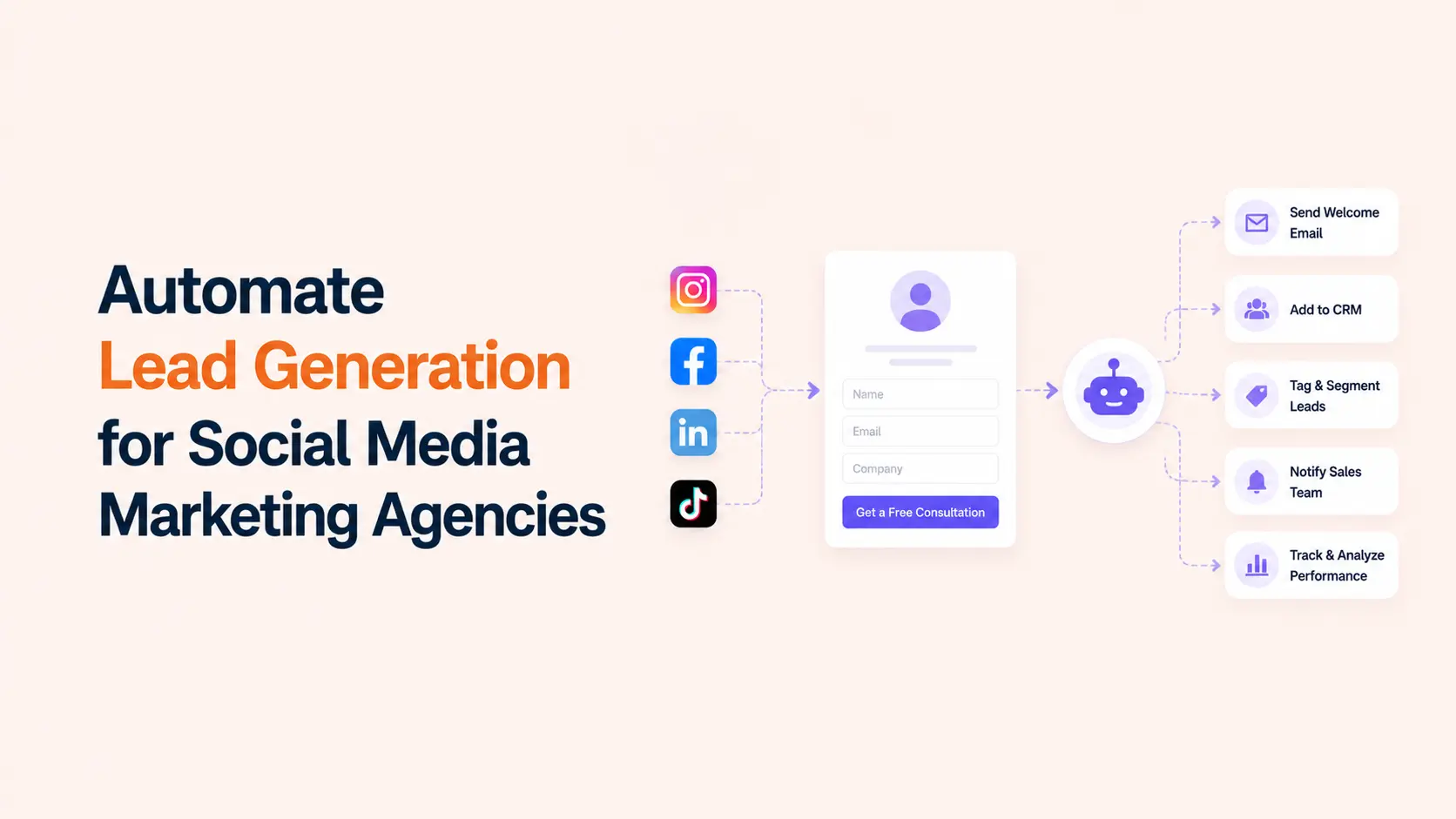


Lead generation automation for a social media marketing agency should move qualified prospects from a social touchpoint into a usable sales process without relying on someone to copy data, check inboxes, or remember the next step. The best system connects capture, validation, CRM updates, lead qualification, routing, follow-up, and reporting while keeping sales judgment and sensitive conversations human-led.
The goal is not to automate every interaction. It is to remove the repetitive gaps where good leads are often lost: a form submission sits untouched, a direct-message inquiry never reaches sales, a lead is entered twice, campaign source data disappears, or nobody knows who owns the follow-up. Build the workflow around those failure points first.
TL;DR
A reliable automated lead generation system for a social media agency follows seven connected stages:
- Capture leads from native social forms, landing pages, website forms, DMs, or booking flows.
- Standardize contact fields and preserve campaign, platform, creative, and source information.
- Create or update the CRM record instead of adding duplicate contacts every time someone converts.
- Apply qualification rules based on fit, intent, budget, service need, geography, or another business-specific signal.
- Assign the lead to the correct owner and send a fast internal notification with enough context to act.
- Trigger an appropriate acknowledgement or nurture sequence without pretending an automated message is a personal sales reply.
- Measure lead quality, response time, booked meetings, opportunities, and revenue by source instead of stopping at cost per lead.
The Lead Generation Automation Blueprint
| Stage | Automation job | Human responsibility |
|---|---|---|
| Capture | Receive lead data from a form, landing page, DM workflow, or booking source | Define the offer and questions worth asking |
| Normalize | Map fields into one consistent contact structure | Decide which fields are actually useful |
| Qualify | Apply rules, tags, or scores | Set and review qualification criteria |
| Route | Assign owner, pipeline, task, and notification | Handle exceptions and high-value leads |
| Follow up | Send acknowledgement, reminders, or nurture steps | Run real sales conversations |
| Measure | Connect campaign source to later outcomes | Change budget, targeting, offer, or process |
This workflow works whether the lead originates from paid social, an organic post, a creator campaign, a website form, or a direct conversation. The capture point changes, but the operating problem is the same: turn an expression of interest into an owned, measurable next step.
1. Define What Counts as a Lead Before You Automate Anything
A social media marketing agency may receive many signals that look like leads: a form submission, a pricing-page visit, a DM asking for rates, a webinar signup, a downloaded guide, a booked call, or a comment asking for help. They should not all enter the sales pipeline with the same priority.
Define the minimum information and intent required for each lead type. A booked strategy call may be sales-ready immediately. A newsletter signup may belong in nurture. A person asking a service-specific question in a DM may need a community manager to qualify the conversation before sales is involved. Clear definitions keep automation from filling the CRM with noise.
2. Choose the Right Lead Capture Paths
Social agencies typically collect leads through four main paths: native social lead forms, external landing pages or website forms, direct messages, and booking flows. Meta, LinkedIn, and TikTok all support native lead-generation experiences in their advertising ecosystems, while external pages give the agency more control over the form, tracking, content, and post-submit experience.
Use native forms when reducing friction matters and the platform can provide the fields you need. Use a landing page when the offer requires more explanation, stronger qualification, custom logic, or a deeper conversion path. For high-intent services, a booking page can be the conversion itself. For DMs, use automation primarily to identify intent and route the conversation rather than to impersonate a salesperson.
| Lead source | Good use case | Automation priority |
| Native social lead form | Paid campaigns where low-friction capture matters | Send lead to CRM immediately with campaign/source fields |
| Landing-page form | Higher-consideration services and qualification | Validate, enrich, score, route, and trigger follow-up |
| DM inquiry | Organic social, creator campaigns, community interest | Classify intent and alert the right person |
| Booking form | High-intent prospects ready to speak | Create opportunity, assign owner, notify, and send preparation details |
The channel strategy should already be defined in your social media marketing plan. Automation should support the channels where the agency is deliberately generating demand, not create new channels simply because a connector exists.
3. Standardize the Data Before It Reaches the CRM
One of the most important automation decisions is field mapping. Decide how first name, last name, email, phone, company, website, service interest, budget range, location, campaign, ad set, creative, platform, UTM values, consent, and lead timestamp will be stored. If every source uses different labels, reporting and routing become unreliable.
Preserve source data even when the CRM does not show every field on the main contact screen. The agency should be able to answer which platform, campaign, offer, and conversion path created a qualified opportunity later. Avoid overwriting the original acquisition source when the same person converts again through another campaign. Store first-touch and latest-touch information separately if the CRM supports it.
4. Create or Update the CRM Record Without Duplicates
Do not make “create contact” the only automation action. First search for an existing record using a stable identifier such as email address, phone number, or another account-specific key. If the person already exists, update the relevant fields, append the new campaign context, and create the next activity instead of producing a second contact.
This is especially important for agencies running several campaigns for the same client. A prospect may download a guide, return through retargeting, submit another form, and later book a call. Those interactions should strengthen one record, not create four disconnected leads.
5. Qualify Leads With Rules That Reflect the Client’s Business
Lead scoring should be simple enough that sales can understand why a prospect received a priority. Start with explicit signals such as requested service, company size, location, budget range, timeline, job role, current platform, or whether the person booked a meeting. Add behavioral signals only when they improve a real routing decision.
- High priority: fits the client profile, asks about a core service, and indicates near-term intent.
- Medium priority: fits the audience but needs education, budget clarity, or a later timeline.
- Nurture: relevant contact with weak current buying intent.
- Disqualify or review: outside the service area, spam, competitor inquiry, invalid details, or clearly mismatched need.
Do not hide qualification logic inside a tool nobody reviews. Document it. When the agency learns that a certain question predicts poor lead quality or a previously low-priority segment converts well, update the rules.
6. Route Each Lead to a Named Owner
Routing should answer three questions automatically: who owns this lead, what must happen next, and when is it due? Assignment may depend on client account, service, territory, language, deal size, campaign, or round-robin logic. The automation should create the appropriate CRM owner, task, pipeline stage, and internal notification.
The notification should include enough context to avoid a second lookup: name, company, requested service, source campaign, qualification answers, score or priority, and a direct link to the CRM record. High-intent leads can trigger an immediate alert while nurture leads may not need a real-time interruption.
7. Automate the First Response Without Faking a Human Conversation
A fast acknowledgement is useful. It can confirm receipt, explain the next step, provide a booking link, deliver the requested resource, or tell the lead when to expect a response. The message should be truthful about what is automated. Do not send a fake personal reply that implies a salesperson has read the inquiry when nobody has.
For agencies generating leads through organic content, the quality of the initial message still matters. Strong offers, clear CTAs, and useful copy create better inputs for the automation. The principles in our guide to writing engaging social media captions apply directly to lead-focused posts.
8. Build Nurture Around the Reason the Lead Converted
Do not send every lead into the same generic sequence. A person who requested a paid social audit should receive different follow-up from someone who downloaded a content calendar or asked about social media management. Use the original offer and qualification data to choose the next content, case study, service explanation, or invitation.
Stop or change automated nurture when a salesperson begins an active conversation, a meeting is booked, the person becomes a customer, or the lead opts out. Automation that continues sending “still interested?” messages during an active sales conversation makes the agency look disconnected.
9. Separate Client Workflows So Agency Operations Stay Clean
A social media marketing agency may run similar lead flows for many clients, but client data, CRM destinations, credentials, notification channels, qualification rules, and consent requirements should remain separated. Reusable templates are useful; shared data stores are not.
Create a standard workflow pattern and then configure client-specific variables: account identifiers, campaign naming rules, CRM fields, owner mapping, allowed services, business hours, escalation contacts, and reporting destinations. If the agency also manages many social profiles, define access and ownership using the controls described in our guide to managing multiple social media accounts.
10. Add Logging, Retries, and a Manual Fallback
A workflow is not reliable just because the happy path works. Log the submission ID, source, CRM result, assigned owner, timestamp, and any failure message. If an API times out or the CRM rejects a record, retry only when it is safe to do so and avoid creating duplicates. After repeated failure, create an alert or manual-review task instead of silently dropping the lead.
For more complex systems, treat this as a proper workflow automation problem: define triggers, validation, branching, idempotency, error handling, approvals, and recovery. Lead generation is revenue-facing, so silent failure is more expensive than an obvious manual fallback.
Three Practical Lead Generation Automation Workflows
Paid Social Lead Form to CRM
Trigger when a new native lead form is submitted. Validate required fields, search the CRM for an existing contact, create or update the record, attach campaign and creative details, apply qualification rules, assign an owner, create a follow-up task, send an internal alert for high-priority leads, and send the prospect a truthful confirmation. Log the result.
Organic Social Post to Qualified Booking
Publish educational or proof-based content with a clear CTA to a focused landing page. Capture the form with UTM and referrer data, qualify the submission, route high-intent prospects to a booking option, add lower-intent prospects to relevant nurture, and attribute later meetings or opportunities back to the original social source. A scheduler can help distribute the campaign consistently; compare options in our social media scheduler guide.
DM Inquiry to Sales Handoff
Detect a message that contains service or pricing intent, tag the conversation, ask only the minimum structured question needed if automation is appropriate, and notify the assigned human with the conversation context. After the person confirms interest, create or update the CRM record and let the salesperson continue. Do not automate sensitive negotiation or complaint handling.
How to Measure Lead Generation Automation
| Metric | What it tells the agency |
|---|---|
| Lead response time | Whether automation gets high-intent leads to a person faster |
| Qualified lead rate | Whether campaigns and qualification rules are producing useful contacts |
| Duplicate rate | Whether CRM matching and update logic are working |
| Booking rate | Whether qualified leads are taking the next sales step |
| Opportunity rate | Whether social leads become real pipeline |
| Cost per qualified lead | Whether paid acquisition remains efficient after quality is considered |
| Revenue by source | Which platforms, campaigns, and offers create customers rather than just form fills |
| Workflow failure rate | Whether the automation itself is operationally reliable |
Cost per lead is useful, but agencies should not optimize it in isolation. A campaign with a higher CPL can be more profitable if those leads book more meetings and close at a higher rate. Connect campaign reporting to the later funnel wherever the client’s systems allow it.
What Should Stay Human-Led?
- Defining the client’s ideal customer profile, offer, qualification criteria, and sales process.
- Reviewing ambiguous or high-value leads that do not fit simple scoring rules.
- Sales discovery, negotiation, objection handling, and relationship-building.
- Responding to complaints, sensitive DMs, legal issues, or reputation risks.
- Approving new automated messaging, especially claims about results, pricing, guarantees, or regulated services.
- Changing budgets or campaign strategy based on business context rather than a single automated alert.
This follows the same principle as broader social media automation: automate repeatable execution and information movement, but keep judgment where context and accountability matter.
A Simple Implementation Order for Agencies
- Choose one client and one lead source with enough volume to expose the current manual problems.
- Map the existing process from submission to sales follow-up and identify every handoff.
- Standardize the fields, CRM matching rule, source tracking, qualification logic, and owner assignment.
- Automate capture to CRM first, then add routing, notifications, and acknowledgement.
- Add logs, duplicate protection, retries, and a manual review path before scaling.
- Measure response time, qualified lead rate, booking rate, opportunities, and workflow failures for several weeks.
- Turn the stable workflow into a reusable agency template, while keeping client credentials and data isolated.
Do not begin by connecting every platform and tool the agency owns. Start with the lead source that is creating the most repetitive work or the most costly follow-up delay. Once that path is stable, expand the same operating model to other sources.
Build the System Around Lead Quality, Not Automation Volume
A strong automated lead generation system should make the agency faster without making it less personal. Capture data once, preserve source context, keep one clean CRM record, route the prospect to the right person, and make failures visible. The useful outcome is not “500 automated actions.” It is more qualified conversations reaching the right owner with less manual work and better attribution.
Frequently Asked Questions
What is lead generation automation for a social media marketing agency?
It is a workflow that moves lead data from social campaigns or conversations into the agency or client’s sales system automatically. Typical steps include capture, validation, CRM creation or update, qualification, assignment, notifications, acknowledgement, nurture, and reporting.
Which social media leads should be automated into a CRM?
Automate leads when there is enough identity and intent to create a useful record. Native lead-form submissions, qualified website forms, booked calls, and clear service inquiries are common examples. Low-intent engagement such as likes or generic comments usually should not become CRM leads automatically.
Should agencies automate replies to social media leads?
Automated acknowledgements can confirm receipt, deliver a resource, provide a booking link, or explain the next step. Real sales conversations, negotiation, sensitive questions, and complaints should remain human-led. Automated messages should not pretend a salesperson personally reviewed a lead when they did not.
How can an agency prevent duplicate leads in automation?
Search the CRM for an existing contact before creating a new one. Match using a stable identifier such as email or phone, then update the existing record and attach the new source or activity. Also make retries idempotent so the same submission cannot create repeated records.
What is the best first workflow to automate?
Start with one high-volume, low-risk path such as a paid social lead form or website form feeding the CRM. Automate field mapping, duplicate checks, assignment, notification, and logging before adding complex scoring or multi-step nurture.
How do you measure ROI from lead generation automation?
Compare the process before and after automation using response time, manual handling time, duplicate rate, qualified lead rate, booking rate, opportunity rate, workflow failures, and revenue by source. For paid campaigns, cost per qualified lead is usually more informative than cost per raw form submission.
Can AI qualify social media leads automatically?
AI can help classify free-text inquiries, summarize conversations, or suggest a qualification category, but deterministic business rules are easier to audit for critical routing. Use human review when the model is uncertain, the lead is high value, or the decision could materially affect the prospect.